
Can you imagine an application that, when you input some data or press a button, freezes and waits for a long action to finish executing? Exactly, me neither… How is it done in c#?
What are Threads?
A thread is the fundamental unit to which the operating system allocates processor core time. You can think of it as an independent code execution within a single process.
Thanks to threads, an application can perform several operations concurrently or in parallel. Instead of executing tasks one after another (sequentially), the program can delegate different parts of the work to independent threads.
Concurrency – means that multiple tasks are making progress over the same period. Even on a single-core processor, the operating system rapidly switches between threads (this is called context switching), giving the illusion of simultaneous execution.
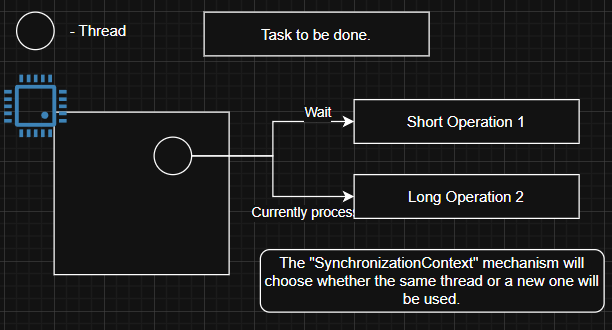
The pharmacist(thread) in a pharmacy can be an analogy for a thread. If he’s serving us, he’s doing one task. If she goes to the back room for medicine, we are waiting until he finishes and comes back.
Parallelism – is true simultaneous execution. Different threads can literally run at the same time on different cores, significantly speeding up tasks.
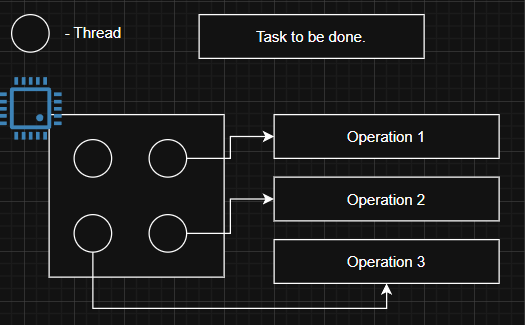
If we pack 1000 gift packages by ourselves, it will take X amount of time. If there are 4 of us, we will theoretically do it 4 times faster.
Fortunately, C# provides the Task Parallel Library (TPL) along with the async and await patterns, which greatly simplify multithreading. By using these high-level abstractions, you allow the .NET runtime to handle the complexities of thread management, such as task scheduling, thread allocation, and synchronization, letting you focus more on your application’s core logic.
// async await
async Task LongRunningOperation() { /* ... */ }
async Task SomeMethod()
{
    ShortRunningOperation();
    await LongRunningOperation();
    ShortRunningOperation();
}

// Thread's
void LongRunningOperation2() { /* ... */ }
var thread = new Thread(LongRunningOperation2);
thread.Start();
What is SynchronizationContext?
SynchronizationContext is a mechanism that provides a way to „capture” and „return” to the original execution context (thread) after an asynchronous operation completes. Its main task is to ensure that code continuations (i.e., what happens after await) are executed in the appropriate environment.
Think of it as a „task dispatcher” for a specific thread. When an asynchronous operation is await-ed, the current SynchronizationContext is „captured.” Once the operation finishes, the SynchronizationContext uses its Post (or Send) method to schedule the continuation back onto the thread from which it was captured.
Reason 1: Divide and Conquer
Imagine you have a single long task running on just one thread. If you can break that task into smaller pieces that can run at the same time, you’ll get a big speed boost! It’s just like our example with Parallelism: if four people wrap gifts, in the best case, they’ll finish four times faster than if you did it all by yourself! (Parallelism in most cases)

Here are some real-world scenarios where the „Divide and Conquer” approach truly makes C# threads shine:
- Massive Data Processing: Need to analyze huge datasets—think millions of financial transactions or scientific simulations? Instead of one thread grinding through it all, split the data, assign chunks to individual threads, and unleash parallel processing power!
- Visual Media Transformation: Whether it’s filtering huge images, rendering video, or compressing high-res files, these tasks involve repeating operations. Threads can tackle different parts of the image or video frames concurrently, dramatically speeding up your workflow.
- Compute-Intensive Operations: From password cracking to complex statistical models or AI training, many problems demand serious number crunching. By dividing the workload, threads can explore options or process input ranges in parallel, slashing execution times.
- Naturally Parallel Algorithms: Certain algorithms are perfectly suited for concurrent execution. Imagine sorting a giant list: break it down, sort the smaller parts in parallel, then merge.
Second Reason: Offload Long-Running Tasks
Imagine using an application that suddenly „freezes” for a dozen seconds when you try to save a large file or generate a complex report. Frustrating, right? This happens because the application’s main task—usually the one responsible for the user interface (UI)—is busy performing a time-consuming operation instead of responding to your clicks or typing. This is where offloading long-running tasks with threads comes to the rescue. (Concurrency in most cases – async/await)
async Task SomeMethod()
{
    ShortRunningOperation();
    ShortRunningOperation();
    ShortRunningOperation();
    await LongRunningOperation(); // this takes too long, it will block main thread. (this is why We use await!)
    ShortRunningOperation();
    ShortRunningOperation();
}
The key idea is to move („offload”) time-consuming operations from the main thread (which is typically responsible for UI responsiveness or handling server requests) to background threads. This frees up the main thread, allowing it to continue its work.
Here are some examples where task offloading is useful:
- Maintaining User Interface (UI) Responsiveness: If your desktop or mobile application needs to perform complex operation, moving these operations to a background thread ensures the UI won’t freeze. The user can still click buttons, scroll views, or input data while the „heavy lifting” happens invisibly in the background.
- Input/Output (I/O) Operations: Tasks like downloading files from the internet, reading and writing large amounts of data to disk, etc. Are slower than CPU-bound operations. Waiting for these operations to complete without using threads would waste valuable resources and block the application. By offloading them, the processor can handle other tasks while waiting for I/O operations to finish.
- Server-Side Application Scalability: In web or server applications (e.g., APIs), each incoming client request is typically handled by a thread. If one request requires a long-running operation (like a complex database query or report generation), offloading this operation to a separate thread (or using asynchronous I/O operations, which often leverage thread pool threads in the background) allows the server’s main thread to handle subsequent requests without waiting.
- Background Processing: Sometimes an application needs to perform tasks that aren’t critical for immediate user interaction but are still important.
Disadvantages of Using Threads
- Complexity: Can be more complex to write, understand, debug, and maintain due to the need for synchronization and coordination between threads.
- Synchronization: Requires careful synchronization. Without proper locks or synchronization mechanisms, threads can interfere with each other, causing unpredictable behavior or crashes.
- Potential for Deadlocks and Starvation: Improper synchronization can cause deadlocks, where two or more threads wait indefinitely for each other, freezing the program. Starvation can occur when some threads are perpetually delayed and never get CPU time.
- Performance Overhead: Creating and destroying threads is costly in terms of CPU and memory. Excessive thread creation can lead to performance degradation due to context switching overhead. On single-core processors, multithreading can even reduce performance because of this overhead. (Redis operates on a single-threaded event loop)
Best Practices
- Prefer Higher-Level Abstractions (TPL and async await) – These abstractions simplify asynchronous programming, improve readability, and reduce the risk of errors
- Avoid Deadlocks and Race Conditions
Carefully design locking order and minimize lock scope. Use tools like cancellation tokens to safely cancel operations and avoid deadlocks. - Choose the right synchronization tool for the scenario
Monitor for lightweight locking within a process, Mutex for cross-process synchronization, Semaphore to limit concurrent access to resources. Etc. (more will be in another post) - Avoid sharing mutable states
Shared mutable states will lead to bugs and race conditions, which can be tricky. Ensure to avoid mutable states at any cost. - Use Thread-Safe Collections
Utilize .NET’s concurrent collections (e.g., ConcurrentDictionary, ConcurrentQueue) to safely handle shared data without complex locking.
Conclusion
In a world where many applications handle thousands, millions of requests, where we need to compute/generate various things, and where users expect a smoothly operating application, it’s hard to imagine a world where applications run on a single thread. That’s why it’s worth delving into this topic and understanding it very well.
Biography
https://bizcoder.com/threads-in-csharp/
https://learn.microsoft.com/en-us/dotnet/standard/threading/threads-and-threading
https://www.udemy.com/course/master-multithreading-asynchronous-programming-in-csharp-dotnet
https://www.reddit.com/r/csharp/comments/41ojvk/question_about_threads_and_blocking_calls/